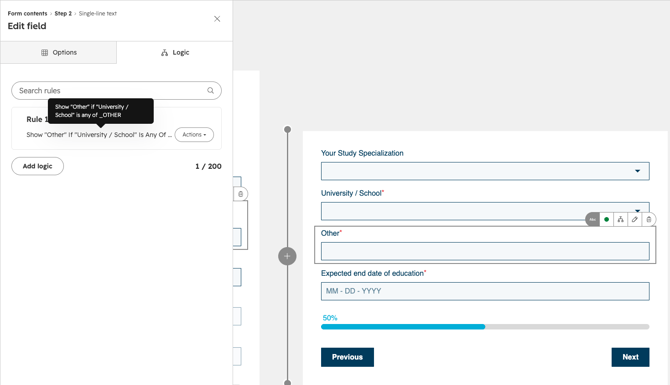
HubSpot uses an Institution custom object to manage all universities. When a student fills out a registration form (such as the B2B shop registration) and selects their country's university from the dropdown list, an automated workflow associates the contact to that specific Institution record.
Find everything you need to know about the Institutions Custom Object HERE
If a student's university is not in the predefined list, markets can use the Institutions Other property (institutions_other) to capture the name directly on the contact record.
Step-by-Step Setup in Form Builder
- Go to Marketing > Lead Capture > Forms and open your local registration form or any upcoming sign-up form
- Locate your regional institution dropdown field (e.g.,
institutions_pl,institutions_uk). If it is not present, add the property to your form. - In the left panel search bar, search for the contact property
Institutions Other. - Drag and drop
Institutions Otherdirectly below your country's institution property. - Click Update / Publish in the top right.