
- Introduction to HubSpot
- HubSpot Login and Profile Setup
- What is a Ticket Pipeline and How is Structured
- Accessing the Help Desk and Setting up a Custom View
- Analyzing and Testing the Customer Service Form
- Analyzing and Replying to a Ticket
Please note that the sender issue has now been fixed. The correct team signature should update automatically.
If for any reason the sender address is not correct or the signature does not update properly, please get in touch with us through this form so we can investigate.
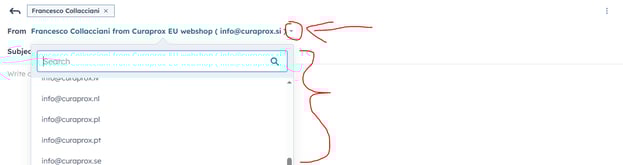
👀 If you still need to adjust the sender manually, follow these two simple steps:
1) Click the three dots next to the customer’s name.

2) Click the arrow and select your country-specific email address.
How to Edit the Subject Line of Your Email Response to the Customer:
1) Click the three dots next to the customer’s name.
2) Replace the text in the "Subjct" field.

7. Requesting for 2° Level Support (EU Shop only)
8. Closing a Ticket
9. Previewing the automated E-mails after the Form Submission
10. Technical Support?
Technical Support Request Form
Please use the form at the end of the article to report any technical issues or request assistance. Provide as much detail as possible to help us resolve your issue quickly and efficiently.
🔧 What can you use this form for:
-
Reporting bugs or system errors
-
Requesting technical help or troubleshooting
-
Notifying us of login or access issues
📄 What to include:
-
A clear description of the problem
-
Any relevant screenshots or error messages
SUBMIT A TECHNICAL SUPPORT REQUEST
We’ll get back to you as soon as possible. Thank you for helping us keep everything running smoothly!